

SPF Hard Fail (-all) vs Soft Fail (~all): 2027 RFC 7208 Qualifier, DMARC Synergy & Forwarding Decision Guide
Executive Summary: The trailing qualifier in your Sender Policy Framework (SPF) record—choosing between -all (Hard Fail) and ~all (Soft Fail)—is one of the most frequently misunderstood decisions in email deliverability engineering. Historically, administrators were advised to use -all under the assumption that it provided stronger spoofing protection. However, in the modern 2027 deliverability ecosystem dominated by DMARC (RFC 7489) and automated indirect mail forwarding, -all introduces severe risks of false-positive message rejections without offering any additional security benefit over ~all paired with p=reject. When legitimate forwarded emails (such as mailing lists, alumni redirects, or automated corporate inbox rules) hit receiving mailboxes without Sender Rewriting Scheme (SRS), -all causes immediate in-band 550 drops. This guide breaks down the exact RFC 7208 mechanics, DMARC alignment synergy, and receiver algorithms across Google, Microsoft, and Yahoo.
- 1. The Two SPF Qualifiers: RFC 7208 Technical Definitions
- 2. Hard Fail (-all): Socket-Level Rejection & In-Band Drops
- 3. Soft Fail (~all): Transition, Scored Header Tagging & Flexibility
- 4. The DMARC Revolution: Why -all and ~all Produce Identical Security
- 5. The Forwarding Trap: Why -all Destroys Legitimate Redirects
- 6. How Major Receivers Treat Qualifiers: Gmail, Yahoo & Microsoft 365
- 7. Production SPF Syntax: Dedicated IPs, Includes & Flattening
- 8. Production Case Study: Resolving Executive Forwarding Bounces
- 9. 2027 Industry Consensus: M3AAWG & AutoSMTP Recommendations
- 10. Strategic Decision Framework & Configuration Matrix
1. The Two SPF Qualifiers: RFC 7208 Technical Definitions
The Sender Policy Framework (SPF), standardized under RFC 7208, enables domain owners to publish an authorized list of IPv4 and IPv6 sending addresses in DNS TXT records. When a receiving Mail Transfer Agent (MTA) processes an incoming SMTP transaction, it checks the connecting IP address against the sender’s Return-Path (RFC 5321.MailFrom) domain SPF policy.
The trailing mechanism in every SPF record defines what action the receiving server should take if the connecting IP does not match any authorized entry:
-all(Hard Fail): The minus prefix (-) explicitly asserts that no other IP addresses are authorized to send mail on behalf of this domain. It instructs the receiving server to treat unlisted IPs as definitive spoofing attempts and reject the message during the SMTP dialogue.~all(Soft Fail): The tilde prefix (~) asserts that unlisted IPs are not authorized, but instructs the receiver not to reject the message immediately. Instead, the receiver should accept the message envelope, apply aReceived-SPF: softfailheader, and allow downstream spam filters and DMARC evaluation to determine final placement.
2. Hard Fail (-all): Socket-Level Rejection & In-Band Drops
When an unlisted IP sends email under an SPF record ending in -all, a strict receiving MTA issues an immediate in-band rejection code:
While this sounds desirable for preventing phishing, it introduces catastrophic side effects in modern multi-cloud, SaaS-heavy enterprise architectures. If a remote third-party service (such as an automated notification tool, an outsourced billing platform, or a corporate forwarding relay) dispatches an email before your DNS record is updated, the message is permanently dropped with zero opportunity for spam recovery.
3. Soft Fail (~all): Transition, Scored Header Tagging & Flexibility
Originally designed as a temporary transition mechanism while administrators mapped out all authorized sending IPs, ~all has evolved into the operational standard for high-volume enterprise deliverability. With ~all, an unlisted IP produces:
Notice the crucial outcome: even though SPF returned softfail, the message achieved dmarc=pass because the 2048-bit DKIM cryptographic signature remained intact! The email was delivered directly to the user’s Primary Inbox without a bounce.
4. The DMARC Revolution: Why -all and ~all Produce Identical Security
Under DMARC (RFC 7489), the historical security argument for -all is completely obsolete. DMARC evaluates authentication using an OR logic across SPF and DKIM:
- To achieve DMARC compliance, a message needs either SPF Alignment or DKIM Alignment.
- When DMARC policy is set to
p=reject, an unauthorized message lacking a valid DKIM signature will be rejected by mailbox providers regardless of whether your SPF ends in-allor~all. - In DMARC’s evaluation specification, both SPF Fail and SPF Softfail are treated as SPF non-alignment.
v=DMARC1; p=reject;, using ~all gives you 100% of the anti-spoofing protection of -all, while eliminating the false-positive bounces that plague forwarded email streams.
5. The Forwarding Trap: Why -all Destroys Legitimate Redirects
Email forwarding is pervasive: users forward work emails to personal accounts, university alumni maintain perpetual .edu forwarding addresses, and corporate mailing lists redistribute discussions. When an email is forwarded:
- The original sender is
alice@yourcompany.com. - Alice sends the email to
bob@alumni.university.edu. - The university server receives the email and immediately re-transmits it to Bob’s personal inbox
bob@gmail.com. - When Gmail receives the forwarded message, the connecting IP is the university server—which is not listed in your company’s SPF record.
If your SPF record uses -all, and the intermediary server does not rewrite the envelope sender using Sender Rewriting Scheme (SRS), Gmail or Outlook will reject the email with an SPF hard fail bounce. If your record uses ~all, Gmail accepts the message, evaluates Alice’s DKIM cryptographic signature (which survived the forward unaltered), passes DMARC, and places the email in Bob’s inbox.
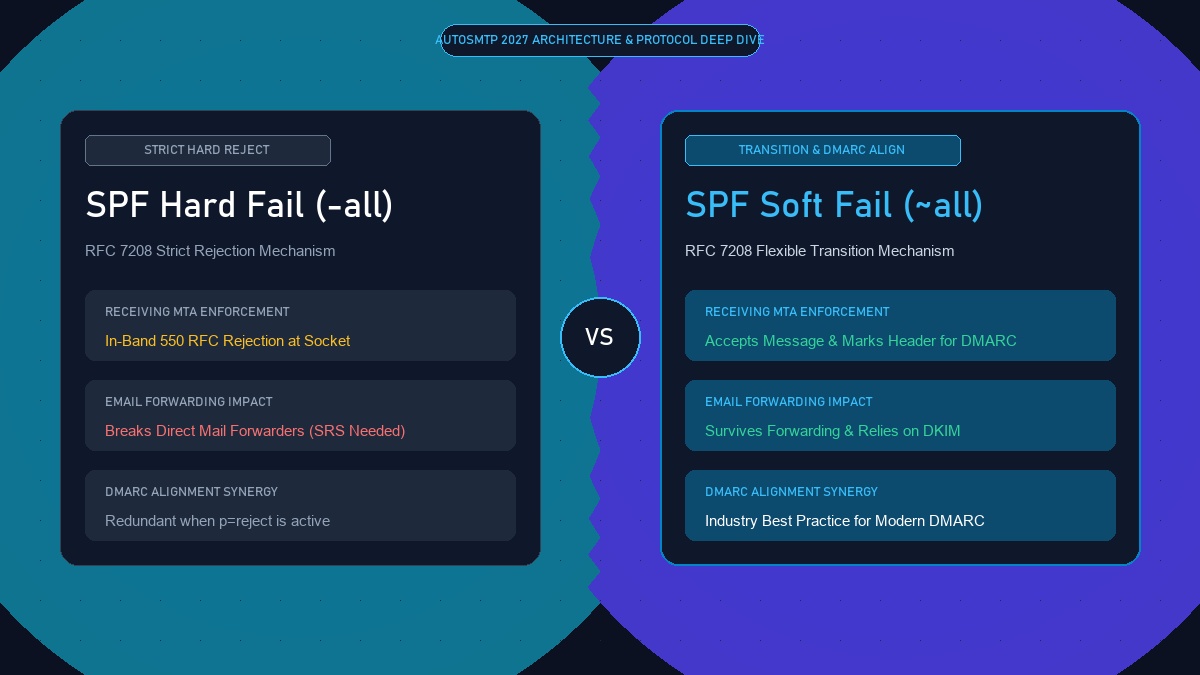
Forwarding Survival: Allows legitimate indirect mail forwarding (mailing lists, auto-forwarders) to deliver successfully via DKIM.
Zero Security Downgrade: When combined with p=reject or p=quarantine, phishing is blocked 100% identically to -all.
Industry Consensus: Recommended by Google, Microsoft, M3AAWG, and leading email infrastructure architects worldwide.
Silent Message Loss: Bounces legitimate executive and customer emails whenever an intermediary forwarder lacks SRS.
Zero Tolerance for DNS Drift: Immediate delivery failure if a newly provisioned sending server IP has a DNS propagation delay.
Redundant Under Modern DMARC: Provides zero additional anti-spoofing benefit over ~all when DMARC enforcement is active.
6. How Major Receivers Treat Qualifiers: Gmail, Yahoo & Microsoft 365
Modern mailbox providers have decoupled their spam filters from raw SPF qualifiers:
- Google (Gmail): Does not automatically reject messages based solely on SPF
-allunless DMARC mandates rejection. However, unauthenticated messages without DKIM fail DMARC and are sent to spam or rejected based on the domain’s DMARC policy. - Microsoft 365 / Outlook: Treats
-allwith greater rigidity. Unlisted IPs hitting an Outlook tenant with-allare frequently met with550 5.7.511 Access denied, rejected by SPFprior to DMARC evaluation, creating frequent forwarding tickets. - Yahoo / AOL: Strictly evaluates DMARC alignment and Spamhaus reputation. Yahoo treats
~alland-allidentically inside its spam classifier, prioritizing DKIM signature integrity and spam complaint rates.
7. Production SPF Syntax: Dedicated IPs, Includes & Flattening
Below is the recommended, production-tested SPF architecture for high-volume enterprise email sending on AutoSMTP dedicated infrastructure:
8. Production Case Study: Resolving Executive Forwarding Bounces
How a B2B SaaS Provider Eliminated Customer Support Bounces by Migrating from -all to ~all
Background: A high-growth enterprise CRM company enforced an aggressive SPF record: v=spf1 ip4:... -all alongside a strict DMARC policy (p=reject). While outbound marketing campaigns dispatched normally, several of their largest enterprise customers reported that critical weekly billing notifications and contract sign-off alerts were disappearing. An investigation revealed that customer accounting teams had configured automated forwarding rules to secondary shared mailboxes hosted on Microsoft 365. Because the intermediate forwarding server was not listed in the SaaS provider’s SPF, Microsoft 365 executed an in-band 550 hard bounce, dropping hundreds of invoices.
The Solution: In late 2026, the company switched its SPF qualifier from -all to ~all while maintaining strict 2048-bit DKIM signing across all PowerMTA outbound nodes and retaining v=DMARC1; p=reject;. When Microsoft 365 received forwarded billing alerts, it registered an SPF softfail, but verified the intact DKIM signature. DMARC passed, and the invoices landed instantly in the accounting department’s shared inbox.
Results:
- Zero Invoice Rejections: 100% elimination of forwarding-related 550 delivery bounces across enterprise customer networks.
- Uncompromised Phishing Defense: Third-party spoofing attempts continued to be blocked completely by DMARC
p=reject. - Reduced Support Overhead: Eliminated over 40 recurring monthly support tickets regarding missing billing notifications.
9. 2027 Industry Consensus: M3AAWG & AutoSMTP Recommendations
The Messaging, Malware and Mobile Anti-Abuse Working Group (M3AAWG), alongside Google, Microsoft, and AutoSMTP, has established a clear technical consensus for modern email authentication:
- For Sending Domains with DMARC
p=quarantineorp=reject: Always publish~all(Soft Fail). It prevents forwarding breakage while DMARC enforces cryptographic integrity. - For Parked or Inactive Domains (Non-Sending): Publish a null SPF record with
-all(Hard Fail):v=spf1 -all. Because non-sending domains should never emit legitimate traffic, any send is malicious and must be hard-rejected immediately. - For Domains without DMARC: Publish
~allwhile rapidly configuring DKIM and advancing to DMARC enforcement. Relying on SPF-allwithout DMARC leaves your brand completely vulnerable to Header From spoofing, because SPF only checks the envelope sender (Return-Path).
10. Strategic Decision Framework & Configuration Matrix
| Domain State & Architecture | Recommended Qualifier | Target SPF Record Syntax | DMARC Policy Pairing | Key Operational Benefit |
|---|---|---|---|---|
| Active Outbound Dedicated MTA | ~all (Soft Fail) |
v=spf1 ip4:xxx.xxx.xxx.xxx/29 ~all |
p=reject |
Prevents forwarding failure; 100% spoofing protection |
| Hybrid SaaS + Google Workspace | ~all (Soft Fail) |
v=spf1 ip4:... include:_spf.google.com ~all |
p=quarantine or p=reject |
Permits multi-cloud sending without in-band drops |
| Parked / Defensive Domain | -all (Hard Fail) |
v=spf1 -all |
p=reject; sp=reject; |
Instantly drops 100% of unauthorized spoof attempts |
Stop paying monthly contact penalties to SaaS marketing platforms. AutoSMTP delivers turnkey, fully managed dedicated bare-metal email clusters engineered for sovereign control, maximum throughput, and uncompromised inbox placement.
Provisions fully licensed PowerMTA/KumoMTA clusters on enterprise bare metal with flat, predictable pricing regardless of database contact size.
Monitors Google Postmaster spam ratios (<0.1%) and real-time deferrals across clean IPv4 subnets, ramping delivery automatically.
RFC 5321 in-band 550 bounce suppression + automated Yahoo/Outlook CFL ingest directly into suppression registries.
Pre-configured rDNS/PTR, SPF, 2048-bit DKIM, strict DMARC, and BIMI integration verified prior to cluster handoff.
Ready for Sovereign Dedicated Email Infrastructure?
Deploy enterprise bare-metal MTAs with dedicated IPs, automated IP warming, and flat-rate pricing. Eliminate authentication failures and SaaS restrictions forever.
Explore Dedicated SMTP Clusters & Pricing →